Blockchain Networks Made Simple: How to Select the Ideal One for Your Crypto Transfers
Sending crypto can sometimes be nerve-racking, especially when your transfer seems stuck or appears to vanish into thin air.
The good news: your funds are usually still safe.
The bad news: they might be trapped on the wrong blockchain network.
Using an incorrect network is one of the most frequent mistakes beginners make, and it can feel as if your crypto has disappeared for good.
This guide breaks down blockchain networks step by step, explaining how they operate, why they matter, and how to choose the right one for smooth, secure transfers.

What Is a Blockchain Network?
Think of a blockchain network as a digital railway system where your crypto transaction travels. Each network has its own rails, stations, and traffic rules.
For instance:
- ETH belongs to the Ethereum blockchain.
- SOL runs on Solana.
- TTX is native to Tron.
However, certain tokens such as USDT or USDC exist on multiple networks, including:
- Ethereum (ERC-20)
- Tron (TRC-20)
- BNB Smart Chain (BEP-20)
The tricky part is that these tokens look identical in your wallet, but each lives on its own separate track. That’s why picking the right network is so important.
How Blockchain Networks Work
When you press “Send,” your transaction enters a pool waiting for confirmation.
Then:
- A miner or validator picks it up and adds it to a new block.
- Each block connects to the next, forming a chain that secures the network.
- Once your transaction is included in a confirmed block, the funds become available to spend.
Key Differences Between Blockchain Networks
- Transaction Fees:
Ethereum can cost anywhere from a few dollars to over $10 depending on congestion.
Tron usually stays under $1.
BNB Smart Chain averages only a few cents.
Solana fees are often near zero. - Speed:
Some chains confirm transactions in seconds, while others can take several minutes. - Address Formats:
Ethereum and BNB Smart Chain addresses both start with “0x…”.
Tron addresses begin with “T…”. - Explorers:
Each network has its own blockchain explorer for checking transaction status.
💡 Tip: Always verify which network your wallet or exchange supports before sending.
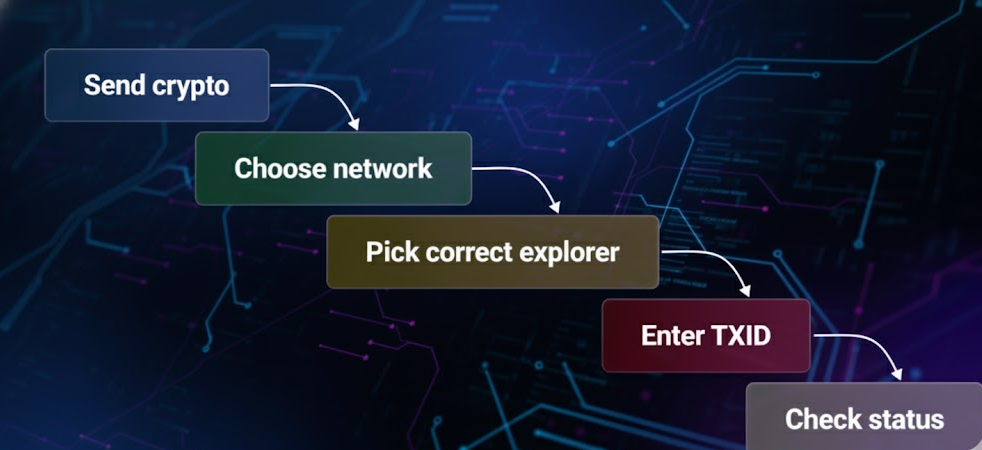
Blockchain Explorers: Your Crypto’s Search Engine
Ever wondered where your crypto went after sending it?
That’s where a blockchain explorer comes in. Think of it as Google for your crypto transactions.
It serves as a crypto network guide, allowing you to track whether your transaction is pending, confirmed, or failed.
Just paste your TXID (Transaction ID), your digital receipt, into the explorer’s search bar.
Explorers show you:
- Status: Pending, sending, confirmed, or failed
- Confirmations: More confirmations mean greater security
- Sender & recipient addresses: Confirm funds went to the right place
- Transaction fee: Helpful if a transaction is stuck due to low fees
Best practices:
- Always check the correct network, not just the token name.
Example: USDT on Tron should be checked via TronScan, not Etherscan. - Always ask for a TXID when receiving crypto. It’s the simplest way to verify.
- Don’t panic if it’s still pending. Some chains confirm in seconds, others take longer.
- If an explorer doesn’t load, try another official one for the same network.
✍️ Example:
You send 100 USDT (TRC-20), and your wallet shows “processing.”
Open TronScan, paste your TXID, and check the block status.
If it says “confirmed,” then the issue lies with the receiving exchange, not the blockchain.
This simple check can save hours of unnecessary stress.
Common Mistakes When Choosing Networks
Even experienced crypto users slip up. Here are the most common errors to avoid:
1. Using the Wrong Network
Example: You’re trading on SwapSpace using TRC-20, but accidentally send ERC-20 USDT instead.
The funds won’t arrive because the exchange never received them on the correct network.
Recovery is difficult and sometimes impossible.
👉 Always match the network exactly.
2. Reusing Deposit Addresses
Some platforms issue one-time deposit addresses.
Sending crypto twice to the same one may cause delays or even loss.
👉 Always verify the address is still valid before each deposit.
3. Ignoring MEMO or Tag
Coins such as XRP, XLM, and BNB require a MEMO or Destination Tag to identify your account.
If omitted, your funds may reach the exchange but won’t be credited to you.
👉 Always copy both the address and the MEMO/Tag.
📓 Example:
You send XRP to Binance without a MEMO. The blockchain shows “success,” but your Binance balance doesn’t change.
Support may recover it, but it often takes days, and not all platforms do.
4. Checking the Wrong Explorer
Looking up your transaction on the wrong explorer (for example, Etherscan for Tron) will show nothing, leading to unnecessary panic.
👉 Double-check the explorer matches your network.
5. Sending from Unsupported Networks
Some wallets and exchanges don’t support certain networks.
Sending crypto there is like mailing a letter to a non-existent address.
👉 Always confirm network support before sending.
How to Choose the Right Network for Your Crypto Transactions
When sending crypto, keep these factors in mind:
- Exchange or Wallet Support
Only use networks supported by both sender and receiver.
SwapSpace, for instance, highlights supported networks clearly for each coin. - Fees vs. Speed
- Tron (TRC-20): Fast, cheap, and great for stablecoins.
- Ethereum (ERC-20): More costly but widely accepted.
- BNB Smart Chain (BEP-20): Low fees and broad support.
- Solana (SOL): Lightning fast but less universal.
Decide what matters most: speed, cost, or compatibility.
- Mainnet vs. Token Networks
If the network isn’t specified, assume the coin’s mainnet.
Example: Sending ETH means the Ethereum mainnet, not a token standard. - Network Congestion
During busy periods, transaction fees rise and confirmations slow down.
Choosing a less congested chain can save time and money. - Security vs. Experimentation
Large, established networks like Ethereum and Bitcoin are more secure thanks to decentralization.
Smaller or newer networks may be cheaper but riskier.
Quick Checklist Before Sending
✅ Match the address format with the chosen network.
✅ Make sure both wallets or exchanges support that network.
✅ Include any required MEMO or Tag.
✅ If unsure, test with a small transfer first.
Best Practices for Safe Transactions
To keep transfers stress-free and secure, adopt these habits:
- Double-check everything: address, network, and amount.
- Use QR codes to avoid typing errors.
- Stick to official explorers like Etherscan, TronScan, or BscScan.
- Enable two-factor authentication on exchange accounts.
- Save your TXID as proof of the transaction.
- Stay updated since networks evolve, and fee systems can change.
Key Takeaways
When moving crypto, details matter.
A single wrong network, a missing tag, or skipping confirmation can result in lost funds.
Remember:
- Coin ≠ Network. Always verify before sending.
- Use the correct explorer to track with your TXID.
- Always double-check the address, network, and MEMO/Tag.
- Platforms like SwapSpace make it easier by clearly showing supported networks.
By understanding how blockchain networks work, you’ll avoid the most common mistakes and make your crypto transfers smoother, faster, and safer.